

Skip to content
  • Events
  • Training
  • Support
  • Blog
  • Promotions
  • Contact Us
  • 1-800-454-2233
  • Shop
  • Events
  • Training
  • Support
  • Blog
  • Promotions
  • Contact Us
  • 1-800-454-2233
  • Shop
gsc-ellison-header-logo
Main Menu
  • 3D Design Engineering Software
  • Markforged
  • Engineering Services
  • Manufacturing Solutions
Main Menu
  • 3D Design Engineering Software
  • Markforged
  • Engineering Services
  • Manufacturing Solutions
  • Software Solutions
        • SOLIDWORKS 3D CAD
        • Simulation
        • Design Automation
        • CAM
        • Cloud Services
        • Electrical Design
        • DraftSight
        • Manufacturing Production
        • Data Management
        • Technical Communications
        • First Article Inspection
        • Hosted Solutions
        • CADchat
        • DELMIAWorks
  • 3D Printers
        • MARKFORGED

        • Desktop Series
        • Industrial Series
        • FX20
        • Metal X
        • FX10
        • Markforged Applications
        • Materials
        • FORMLABS OVERVIEW

        • SLA
          • - Form 4
          • - Form 4B
          • - Form 4L
          • - Form 4BL
        • SLS
          • - Fuse 1+ 30W
          • - The Fuse X1 SLS Ecosystem
  • Engineering Services
    • Implementation
      • 3DEXPERIENCE Services
      • CAD Software Implementation
      • Product Data Management
      • Electrical Implementation Services
    • Training
      • Browse Upcoming Classes
      • Training Catalog
    • Upgrade SOLIDWORKS
      • 2025 Premiere: SOLIDWORKS & 3DEXPERIENCE
    • Productivity Assessments
    • Subscription Benefits
    • Business Process Review
    • CUSTOM APPLICATIONS
  • Manufacturing Solutions

SOLIDWORKS

OMAX microMAX Abrasive WaterJet machine

SOLIDWORKS 2020 – A Few Of My Favorite Things

By Jeff Setzer | September 19, 2019

SOLIDWORKS 2020 is rolling out soon, and there’s so much great new stuff, it’s hard to pick just 5 favorite new things.

Read More
Gentleman seated on a couch, writing

Is Your SOLIDWORKS User Set Up for Success? (A Guide to Assessments)

By GSC | August 29, 2019

How well do you understand your employees’ abilities in SOLIDWORKS? If they could be working more efficiently, consider using our productivity assessments.

Read More
SOLIDWORKS PDM

SOLIDWORKS PDM – Vault Design for Save As & Copy Tree Optimization

By Max Kent | July 11, 2019

PDM vaults can have the same metadata clearing behavior whether Save As or Copy Tree is used, but ultimately, setup and training are the best ways to ensure vault consistency.

Read More
SOLIDWORKS Assembly on screen

Testing SOLIDWORKS 2019 Large-Assembly Performance On Real-World Hardware

By Jeff Setzer | June 27, 2019

New technologies in SOLIDWORKS 2019 make working with large assemblies and complex parts faster than ever before.

Read More
Windows 7 Professional End of Life

SOLIDWORKS & The End Of Windows 7

By Jeff Setzer | May 23, 2019

SOLIDWORKS has long supported Windows 7, but now it’s time to upgrade to Windows 10. Here’s why.

Read More

ENGINEER 3D! Training + Technology Conference Oct. 2-3, 2019

Access Insightful Sessions at Engineer 3D! Training + Technology Conference

By GSC | March 7, 2019

GSC will hold its biennial Engineer 3D! Training + Technology Conference on October 2-3, 2019, at the Potawatomi Hotel and Casino in Milwaukee, WI.

Read More

Instructor and children of past Camp 3D! experience

CAMP 3D! Summer Fun for Kids – Dates Released

By John Setzer | February 15, 2019

Our CAMP 3D! planning is underway! Find dates and activities for the middle school and high school programs.

Read More
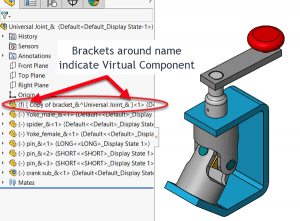
Brackets appear around the component name in the FeatureManager

SOLIDWORKS How-To: Copy a Part Using Virtual Component

By John Setzer | February 8, 2019

When you want to modify a part, but you want to change a copy and not the original, use a virtual part. Learn how.

Read More

Embracing Intelligent Schematics for Electrical Design

By Evan Stanek | January 31, 2019

There are amazing benefits to implementing intelligent schematics for electrical design. Do you know them? What’s the cost of not knowing?

Read More
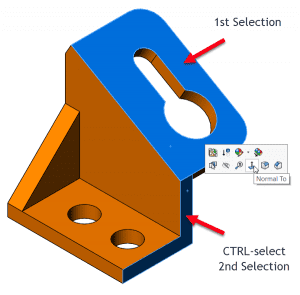
Example of Normal To view and upward facing

SOLIDWORKS How-To: Normal To Orientation Trick

By John Setzer | December 27, 2018

Do you know how to orient a model normal to a face but not have the view orientation use default “Y” orientation?

Read More
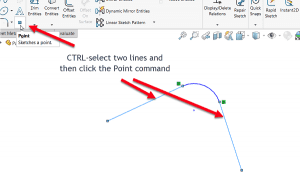
Visual 2 of a virtual sharp created after fillet applied

SOLIDWORKS How-To: Create Virtual Sharps in Sketches

By John Setzer | December 6, 2018

Place a point in a sketch that represents the location of 2 lines intersecting – creating a virtual sharp (not a shared a point).

Read More
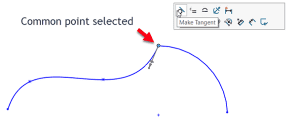
Common point selected

SOLIDWORKS How-To: Add Relations with Shared Sketch Endpoints

By John Setzer | November 15, 2018

Less clicks means less time sketching. Learn how sketch relationships can be quickly added by the press of a button.

Read More
« Newer Posts
Older Posts »

Blog Categories

gsc-ellison-header-logo

W189 N11161 Kleinmann Dr.
Germantown, WI 53022

1-800-454-2233
info@gsc-3d.com

Resources

  • Privacy Policy
  • Terms And Conditions
  • Sitemap
  • Careers
  • About
  • Opt-out preferences
  • Privacy Policy
  • Terms And Conditions
  • Sitemap
  • Careers
  • About
  • Opt-out preferences

Follow Us

Subscribe to our Newsletter

© 2026 GSC | All Rights Reserved.

Cookie Settings
We use cookies to help you navigate efficiently and perform certain functions. You will find detailed information about all cookies under each consent category below.

The cookies that are categorized as "Necessary" are stored on your browser as they are essential for enabling the basic functionalities of the site.
Functional Always active
The technical storage or access is strictly necessary for the legitimate purpose of enabling the use of a specific service explicitly requested by the subscriber or user, or for the sole purpose of carrying out the transmission of a communication over an electronic communications network.
Preferences
The technical storage or access is necessary for the legitimate purpose of storing preferences that are not requested by the subscriber or user.
Statistics
The technical storage or access that is used exclusively for statistical purposes. The technical storage or access that is used exclusively for anonymous statistical purposes. Without a subpoena, voluntary compliance on the part of your Internet Service Provider, or additional records from a third party, information stored or retrieved for this purpose alone cannot usually be used to identify you.
Marketing
The technical storage or access is required to create user profiles to send advertising, or to track the user on a website or across several websites for similar marketing purposes.
  • Manage options
  • Manage services
  • Manage {vendor_count} vendors
  • Read more about these purposes
View preferences
  • {title}
  • {title}
  • {title}
0
    0
    Your Cart
    Your cart is emptyReturn to Shop
    Continue Shopping
    Scroll To Top