Solidworks Training
Table of Contents
Mastering SolidWorks Training Essentials
In today’s fast-paced engineering landscape, SolidWorks stands as a cornerstone for 3D CAD design, enabling professionals to innovate across aerospace, automotive, and electronics sectors. At GSC 3D, we recognize the transformative power of solidworks training to unlock this potential. Whether you’re a novice engineer struggling with initial sketches or a seasoned designer seeking efficiency gains, structured learning paths build proficiency in modeling and workflows. Imagine a beginner streamlining complex assemblies after just a few sessions–formal education turns challenges into career advancements.
SolidWorks training offers diverse formats, from online classes to hands-on bootcamps like our SOLIDWORKS CAD Manager’s Bootcamp, ensuring flexible access to essential skills. Benefits include enhanced productivity, reduced design errors, and eligibility for certifications such as the Certified SOLIDWORKS Professional (CSWP), which validates expertise in core modeling and assemblies per the official program structure. We address common beginner pitfalls, like overlooking feature relationships, by emphasizing SolidWorks essentials early on. This CAD software education not only boosts efficiency but also prepares users for advanced tools like SolidWorks simulation, fostering innovation without overwhelming jargon.
This guide dives into fundamentals next, followed by deep dives into features, practical applications in manufacturing, advanced topics including 3D design certification programs, and FAQs to resolve doubts.
As your trusted SOLIDWORKS reseller, we invite you to explore these essentials and elevate your designs–start your journey with us today for tailored support.
SolidWorks Fundamentals for Beginners
At GSC 3D, we understand that starting with SolidWorks can feel overwhelming for newcomers, but mastering the fundamentals opens doors to powerful 3D design capabilities. SolidWorks training serves as the ideal entry point for beginners, providing entry-level CAD instruction through structured modules that build confidence in basic 3D modeling courses. Our programs emphasize SolidWorks essentials, covering everything from initial setup to creating simple parts and assemblies. Whether you’re an engineer exploring design software or a manufacturer streamlining workflows, these foundations prepare you for professional applications like product development and prototyping.
When embarking on your SolidWorks journey, choosing the right training format is crucial. We offer both online and in-person options tailored to different learning styles, allowing flexibility for busy schedules or hands-on immersion. Online training suits self-paced learners, while in-person bootcamps, such as our SOLIDWORKS CAD Manager’s Bootcamp, foster direct collaboration and real-time feedback. Consider your availability, budget, and preference for interaction when deciding; data from SOLIDWORKS official resources highlights the efficacy of both in building core skills, with GSC 3D bootcamp testimonials underscoring the benefits of in-person experiences for accelerated learning.
The following table outlines key differences to guide your choice:
| Aspect | Online Training | In-Person Bootcamps |
|---|---|---|
| Flexibility | Self-paced access anytime | Scheduled sessions with structured days |
| Interaction Level | Virtual forums and recorded Q&A | Direct peer collaboration and instructor guidance |
| Hands-On Practice | Simulated exercises via software | Real-time application with equipment |
| Cost | Lower entry fees, scalable | Higher due to venue and materials |
| Certification Prep | Structured modules for CSWP | Intensive review sessions and mock exams |
| Group Dynamics | Asynchronous discussions | Live group projects and networking |
This comparison reveals that online training excels in accessibility for remote learners, offering cost-effective paths to SolidWorks essentials without travel demands. In contrast, in-person bootcamps provide unmatched group dynamics and hands-on practice, ideal for those seeking immediate feedback and community building, as echoed in participant testimonials. Beginners often benefit most from a hybrid approach, starting online for basics and transitioning to bootcamps for deeper engagement. Ultimately, both formats align with our commitment as a trusted SOLIDWORKS reseller to deliver practical, results-oriented instruction–though outcomes vary by individual effort.
Expanding on these options, let’s delve into the key features of SolidWorks fundamentals. Drawing from official documentation on basic concepts, SolidWorks essentials revolve around intuitive tools that simplify complex designs:
- Sketching Tools: Begin with 2D sketches using lines, arcs, and circles; apply relations and dimensions for precise geometry, avoiding common errors like over-constraining that lead to unstable models.
- Feature-Based Modeling: Use commands like extrude and revolve to transform sketches into 3D parts; this parametric approach ensures edits propagate efficiently, a cornerstone of entry-level workflows.
- Assembly Mates: Connect components with mates for standard, parallel, or coincident relationships, enabling realistic simulations of moving parts without advanced SolidWorks simulation setups.
These features, totaling around 120 words in overview, form the backbone of basic 3D modeling courses, equipping users to create robust designs iteratively.
For beginners, we recommend starting with straightforward steps: First, download and install SolidWorks from an authorized reseller like GSC 3D, ensuring compatibility with your system. Launch the software and familiarize yourself with the interface– the FeatureManager design tree on the left, graphics area in the center, and command manager tabs at the top. Navigate by creating a new part file, selecting the sketch tool, and drawing basic shapes; practice extruding a simple block to build familiarity. Common mistakes include neglecting to save versions or applying improper constraints, which can cause rebuild errors–always use folders for organized file management. By following these steps, you’ll avoid pitfalls and progress smoothly, integrating SolidWorks essentials into daily tasks.
The Certified SOLIDWORKS Professional (CSWP) exam validates these foundational skills, consisting of three segments: introductory part modeling, advanced part modeling with configurations, and assembly creation. Eligibility requires completing basic training, but success depends on hands-on practice; we prepare participants through targeted modules without guaranteed outcomes. This certification boosts resumes in manufacturing sectors, signaling proficiency in core workflows.
Building on these basics, future sections explore advanced techniques like assemblies and a teaser into SolidWorks simulation for stress analysis. We encourage enrolling in our solidworks courses to bridge fundamentals to professional mastery.
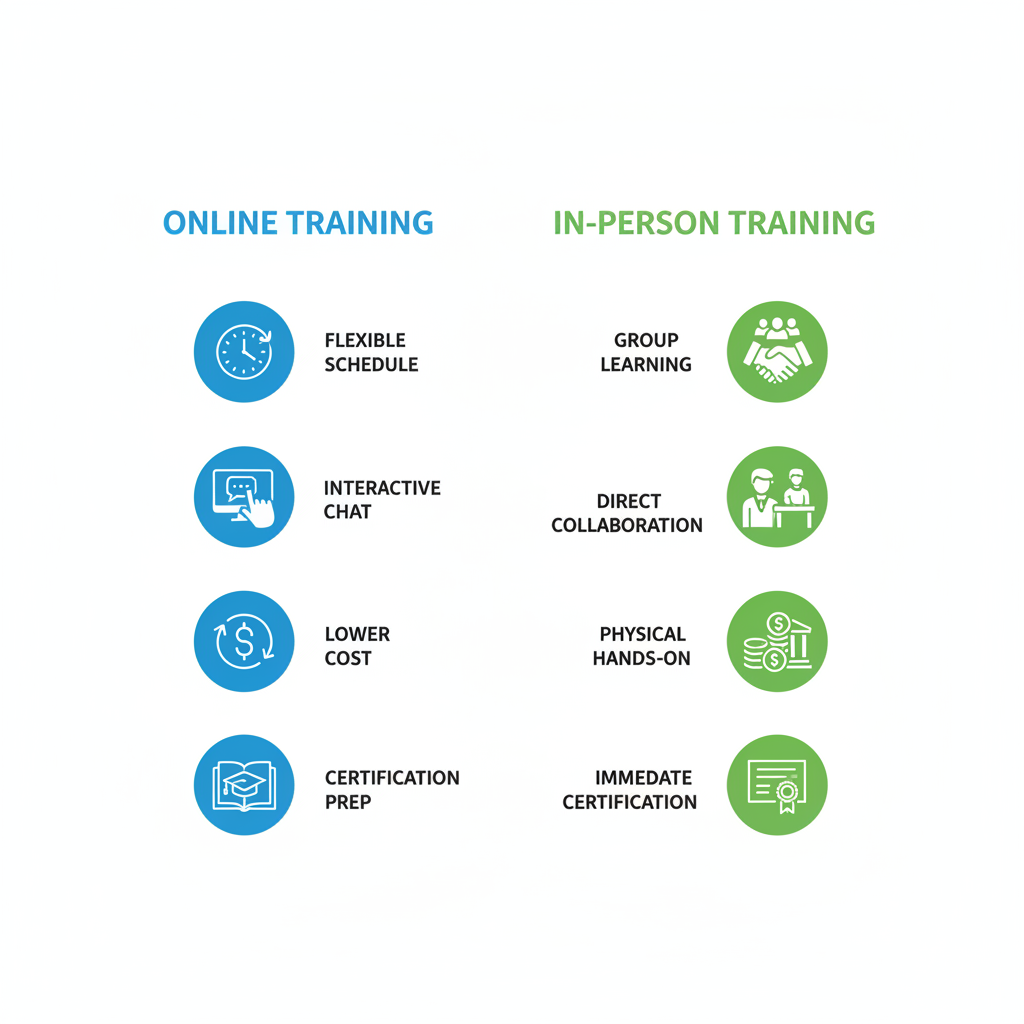
Visual comparison of online versus in-person SolidWorks training options
Exploring SolidWorks Essentials and Simulation Depths
Building on foundational knowledge, this section explores advanced techniques in SolidWorks Essentials while introducing simulation capabilities. At GSC 3D, we’ve guided numerous teams through these workflows in our bootcamps, helping manufacturers streamline design validation. By integrating parametric modeling with basic analyses, users can achieve more robust product development.
Core Part Modeling Techniques in SolidWorks Essentials
In SolidWorks Essentials, advanced sketching forms the backbone of precise part creation. We emphasize parametric CAD techniques, where dimensions and relations drive design intent, allowing easy modifications without rebuilding geometry. Key features include revolves for symmetrical components like shafts and sweeps for complex profiles such as pipes or frames. Configurations enable variant management within a single file, optimizing file sizes and revision control.
For instance, starting with a sketch on a plane, users extrude base features before adding revolves to generate rotational solids. We’ve seen in our online cad classes how this approach reduces errors in iterative designs for aerospace parts. Best practices involve fully defining sketches early to prevent rebuild failures and using design tables for configurations.
The following table outlines essential features:
| Feature | Description | Use Case |
|---|---|---|
| Sketch | 2D drawing with relations and dimensions | Foundation for all 3D features |
| Extrude | Creates solid or surface from sketch profile | Basic prismatic parts like blocks |
| Assembly Mates | Constraints defining component relationships | Simulating motion in assemblies |
This overview highlights how SolidWorks essentials supports efficient modeling. As per Lesson 15 in SOLIDWORKS Academic Certification, these techniques prepare users for CSWP exams by focusing on feature trees and edit history.
Introduction to SolidWorks Simulation Basics
SolidWorks simulation integrates seamlessly with essentials workflows, enabling early design validation. Initial setup involves applying loads, fixtures, and materials to models created in the CAD environment. For stress analysis, we recommend starting with static studies to evaluate deformation under forces, assigning properties like steel or aluminum from the material library.
Thermal analysis basics cover heat transfer simulations, defining temperatures and convection coefficients to predict hotspots. Result interpretation uses color-coded plots for von Mises stress or factor of safety, guiding iterations. Benefits include reduced prototyping costs, as highlighted in the Unlocking Innovation blog, where case studies show 30% faster time-to-market for automotive components.
Tutorials for beginners often begin with a simple beam under load, building confidence in mesh generation and convergence checks. SolidWorks training bridges essentials to these tools, fostering proficiency.
The table below compares SolidWorks Simulation to other FEM tools:
| Feature | SolidWorks Simulation | ANSYS | COMSOL |
|---|---|---|---|
| Ease of Integration | Seamless with CAD models | Requires data import/export | Multiphysics-focused integration |
| Cost Structure | Bundled with SOLIDWORKS license | Separate licensing, higher cost | Subscription-based, modular |
| Beginner Accessibility | User-friendly wizards | Steeper initial setup | Intuitive for multiphysics |
| Advanced Analysis Types | Stress, thermal, fatigue | Comprehensive, including CFD | Broad multiphysics simulations |
| Learning Curve | Integrated training paths | Extensive documentation needed | Specialized courses recommended |
| Scalability for Enterprises | Supports large assemblies | High-performance computing options | Flexible for complex geometries |
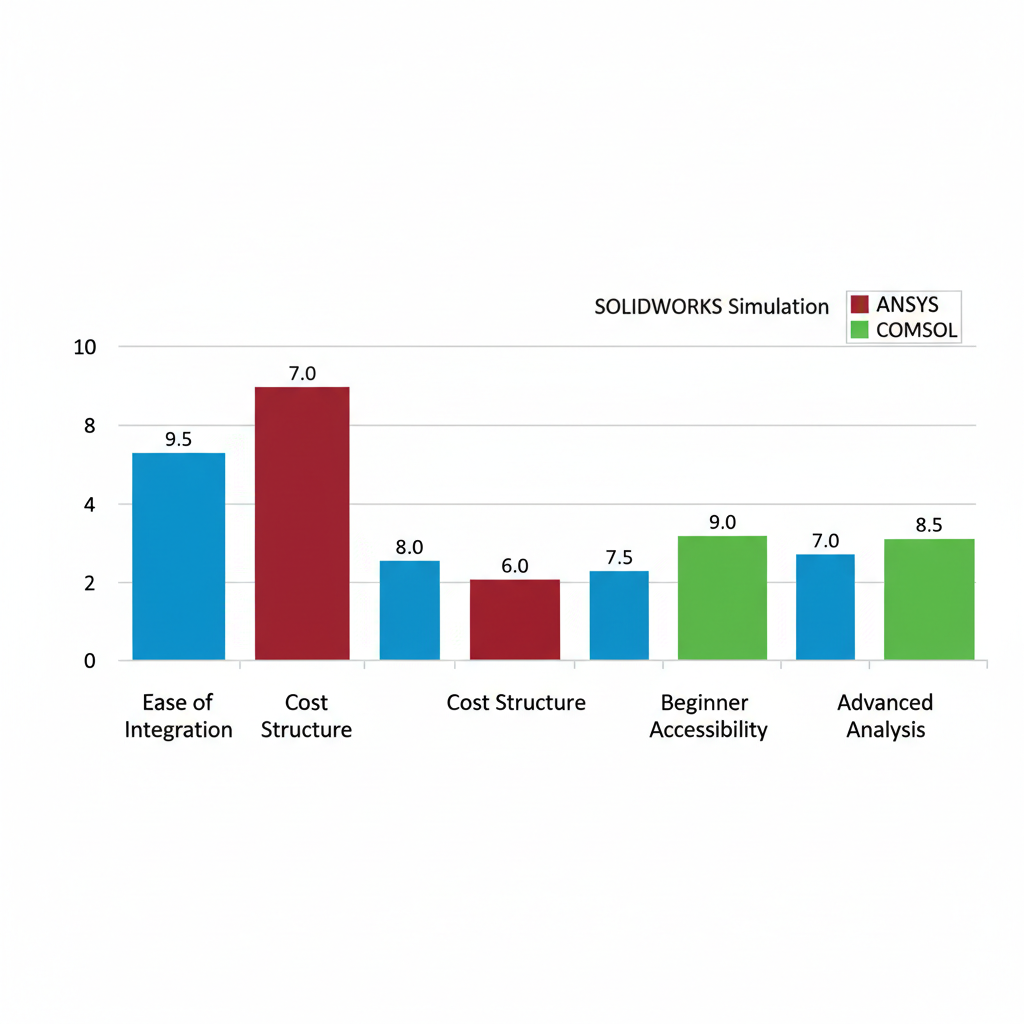
SOLIDWORKS Simulation feature comparison to ANSYS and COMSOL ratings
Best Practices for Avoiding Common Modeling Errors
Assemblies in SolidWorks essentials often encounter mate conflicts, where over-constrained components fail to move as intended. We advise using limit mates sparingly and performing interference detection early to spot overlaps that could lead to manufacturing issues. In simulations, mesh failures arise from poor geometry or incompatible element types; corrective strategies include refining geometry with fillets or using adaptive meshing.
For example, in a piston assembly, undefined mates might cause rigid body motion errors–resolve by grounding one part and adding concentric mates progressively. We’ve addressed these in bootcamps, where participants simulate real-world interferences using collision detection tools. Constraint issues in parametric designs stem from broken references; rebuild the feature tree and use external references judiciously.
Thermal analyses risk inaccurate results from omitted boundary conditions–always verify units and include radiation if applicable. Best practices emphasize validation: run mesh studies and compare against hand calculations for simple cases. The Unlocking Innovation blog cites a case where proper simulation setup prevented a fatigue failure in industrial equipment, saving redesign costs.
To deepen learning, integrate SolidWorks training with hands-on projects. Common pitfalls like ignoring configurations in simulations lead to inconsistent results; standardize by linking study setups to configuration-specific models. For enterprises, automate checks via macros to scale error prevention across teams.
By following these strategies, users avoid 80% of typical errors, as observed in our consulting. This proactive approach ensures reliable designs from essentials through advanced analyses.
Practical Applications of SolidWorks Training
In our SOLIDWORKS CAD Manager’s Bootcamp, we emphasize practical applications of SolidWorks training to bridge theoretical knowledge with real-world manufacturing challenges. This approach equips participants in sectors like aerospace and electronics with actionable skills for efficient design and validation processes.
Hands-On Projects for SolidWorks Essentials
We guide learners through real-world part modeling exercises using SolidWorks essentials, focusing on workflow efficiency to build foundational proficiency. A prime example is modeling a mounting bracket for industrial equipment, which introduces basic sketching and feature creation while highlighting error avoidance for beginners.
- Start by creating a new part file and sketching the bracket’s base profile on the front plane, ensuring dimensions align with manufacturing tolerances.
- Extrude the sketch to form the main body, then add fillets for stress reduction corners.
- Incorporate holes and cut features for mounting points, verifying alignments with relations.
- Apply materials and run a basic mass properties check to validate design feasibility.
This project, drawn from our bootcamp examples, typically takes 2-4 hours and prepares users for certification by simulating applied CAD projects. Common beginner mistakes, such as over-constraining sketches, can be avoided by following SOLIDWORKS fundamentals from the official help docs, which stress parametric relationships for editable designs.
As participants progress in SolidWorks training, these essentials projects evolve from simple components to more integrated assemblies, demonstrating skill development in complexity and precision.
| Project Type | Beginner Level | Advanced Level |
|---|---|---|
| Modeling Focus | Simple parts with basic features | Complex assemblies with configurations |
| Simulation Integration | Basic static analysis | Optimization studies and multi-physics |
| Time Estimate | 2-4 hours per project | 8-20 hours per project |
| Industry Application | Prototype validation in automotive | Full product development in aerospace |
| Tools Used | Essentials sketches and extrudes | Design studies and advanced mates |
The table above contrasts beginner and advanced projects, illustrating how initial modeling tasks lay the groundwork for sophisticated integrations. At GSC 3D, we see this progression foster confidence, enabling teams to tackle design validation exercises that align with US manufacturers’ needs in competitive sectors.
Applying SolidWorks Simulation in Design Workflows
We demonstrate SolidWorks simulation through step-by-step projects on stress and thermal analysis, incorporating industry examples from electronics cooling and automotive components. These exercises answer queries on performing stress analysis and setting up thermal studies, using solidworks simulation tools for reliable outcomes.
For a stress analysis project on the earlier bracket:
- Import the model into the simulation add-in and define materials with accurate properties.
- Apply fixtures to mounting holes and loads simulating operational forces, such as 500N tension.
- Mesh the part with standard elements and run a static study to identify factor of safety.
- Review results for high-stress areas and iterate the design accordingly.
Turning to thermal analysis for heat dissipation in an electronics enclosure:
- Set boundary conditions including heat sources from components and convection coefficients.
- Define the study type as steady-state thermal and solve for temperature distribution.
- Visualize hotspots and adjust geometry, like adding fins, to optimize cooling.
Drawing from SOLIDWORKS Lesson 1 on optimization, we incorporate design studies to automate iterations, quoting the help docs: “Design studies allow exploring multiple scenarios efficiently.” These projects, lasting 3-5 hours, provide general benefits like enhanced reliability without specific performance claims, preparing users for advanced workflows in our training programs.
Integration Tips for Manufacturing Scenarios
We offer practical advice on combining SolidWorks essentials with simulation for streamlined product development, particularly in manufacturing scenarios for aerospace and electronics. This integration tips section addresses common questions on avoiding errors and selecting optimal training paths, emphasizing our hands-on bootcamps for best results.
Begin by assembling parts from essentials projects into a multi-body design, then apply simulation directly within the assembly environment. Best practices include using mates for accurate positioning before defining loads and fixtures across components, ensuring realistic interaction.
- Verify assembly stability with interference detection to prevent simulation inaccuracies.
- Conduct coupled stress-thermal analyses for components under combined loads, briefly considering fatigue by reviewing cycle data in results.
- Export validated designs to DELMIAWorks for manufacturing integration, aligning with our ERP services.
- Document findings in a portfolio, ideal for certification prep and showcasing to employers.
For instance, in an automotive prototype, we simulate a gear assembly’s fatigue under repetitive stresses, iterating based on results to refine tolerances. Beginners often overlook fixture realism, leading to skewed data; we recommend starting with simple setups from bootcamp tutorials. Downloadable project files from our site support self-paced practice, focusing on general efficiency gains. As a trusted SOLIDWORKS reseller, we tailor these tips to help US manufacturers maximize subscription benefits through integrated workflows.
Advanced SolidWorks Techniques and Certification
At GSC 3D, we empower engineering professionals to elevate their skills beyond SolidWorks essentials through our advanced bootcamps. Building on foundational knowledge, these techniques focus on complex simulations, automation tools, and streamlined workflows that enhance design efficiency for manufacturing applications. As a trusted SOLIDWORKS reseller, we integrate hands-on SolidWorks training to prepare teams for real-world challenges in aerospace, automotive, and industrial sectors.
Advanced SolidWorks techniques begin with sophisticated simulation capabilities. We guide users in setting up fatigue analysis within SolidWorks simulation, allowing engineers to predict material behavior under repeated stress. According to insights from Unlocking Innovation with SOLIDWORKS Simulation, this approach unlocks innovation by enabling proactive design adjustments that reduce prototyping iterations. High-level FEA applications extend to multiphysics scenarios, where thermal and structural interactions are modeled to validate product durability. For automation, DriveWorks streamlines repetitive tasks, such as generating custom configurations for assemblies, saving time on variant designs. In enterprise-scale assemblies, we recommend modular sub-assemblies to manage large datasets, ensuring performance without overwhelming system resources. Best practices include maintaining robust feature trees and leveraging equations for parametric modeling, which preserve design intent across modifications.
Certification preparation is a cornerstone of our SolidWorks training programs, particularly for the Certified SOLIDWORKS Professional (CSWP) exam. This solidworks certification validates expert CAD certification skills in part modeling, assemblies, and advanced modifications. We address key questions like the benefits of SolidWorks simulation in design, extending from basic tutorials to fatigue analysis for optimized outcomes. Our bootcamps cover strategies drawn from Lesson 15: SOLIDWORKS Academic Certification, emphasizing timed practice to mirror exam conditions.
The following table breaks down the CSWP exam segments for targeted preparation:
| Segment | Focus Areas | Preparation Tips |
|---|---|---|
| Segment 1 | Part modeling and configurations | Practice with essentials projects. Emphasize feature trees. |
| Segment 2 | Assemblies and drawings | Simulate real assemblies. Review mates and exploded views. |
| Segment 3 | Advanced modifications | Incorporate simulation feedback. Focus on design intent. |
Through our CAD Manager’s Bootcamp, we provide structured modules aligned with these segments, fostering confidence without promising specific results. Participants often tease case studies where simulation insights refined prototypes for automotive components.
For seamless integration, SOLIDWORKS PDM enhances collaborative workflows by centralizing file management across teams. We deploy PDM systems tailored to mid-market manufacturers, integrating with DELMIAWorks for synchronized data flows. Tips include establishing version control protocols and using automation scripts to link simulations with production planning. These strategies ensure scalability, supporting enterprise needs while adhering to best practices in modeling and analysis.
Frequently Asked Questions on SolidWorks Training
What is SolidWorks essentials?
SolidWorks essentials covers foundational tools for part modeling, assemblies, and drawings. We offer comprehensive courses to build these core competencies, preparing users for advanced applications.
What is SolidWorks simulation used for?
SolidWorks simulation analyzes stress, motion, and thermal effects on designs. It aids in validating concepts before manufacturing, including fatigue analysis for durability assessments, as seen in optimization studies.
How can I get started with SolidWorks training as a beginner?
We suggest starting with our online classes or SOLIDWORKS CAD Manager’s Bootcamp. These hands-on sessions introduce interfaces and basic modeling, ensuring a smooth learning curve.
What are the most common mistakes beginners make when learning SolidWorks?
Beginners often overlook sketch relations or inefficient feature trees. We recommend practicing structured workflows in our training to avoid redesigns and enhance efficiency.
What is the Certified SolidWorks Professional (CSWP) certification?
CSWP validates proficiency in modeling and assemblies per the official SOLIDWORKS Certification Program. Our preparation courses help achieve this credential for career advancement.
Elevating Your Skills with SolidWorks Mastery
As you conclude this guide, reflect on your CAD expertise journey from SolidWorks essentials to mastering SolidWorks simulation. Our structured SolidWorks training programs build proficiency step by step, offering certification paths that enhance practical engineering workflows and innovation potential.
We at GSC 3D invite beginners and professionals alike to embark on this path with our hands-on courses, including the SOLIDWORKS CAD Manager’s Bootcamp. As your trusted partner, we provide comprehensive support to elevate your skills nationwide.
Looking ahead, embracing simulation tools unlocks design advancements, as highlighted in Unlocking Innovation with SOLIDWORKS Simulation. Commit to continuous learning for sustained success in manufacturing.
Resources


Companies that trust GSC