Solidworks PDM
Table of Contents
Understanding SOLIDWORKS PDM Essentials
At GSC 3D, we recognize the challenges manufacturers face in managing complex engineering data. solidworks pdm serves as a robust engineering data management system, designed to streamline workflows for teams in aerospace, automotive, and industrial sectors. This CAD file vault solution securely stores and indexes design files, preventing data loss and enabling controlled access across distributed teams.
SOLIDWORKS PDM functions as an essential vault for CAD files and related documentation, integrating seamlessly with SOLIDWORKS CAD tools to automate check-in and check-out processes. This integration ensures version control and revision tracking, addressing common pain points like file overwrites and scattered storage. For instance, in automotive manufacturing, it facilitates precise versioning of part designs, allowing engineers to collaborate without risking errors. As an authorized reseller, we at GSC 3D provide hands-on deployment and training services, ensuring smooth adoption for mid-market and enterprise clients. Our expertise draws from official SOLIDWORKS resources, emphasizing secure collaboration features that enhance productivity.
Basic licensing for US manufacturers typically follows subscription models, with reseller support like ours guiding selection based on team size and needs. This section explores the fundamentals, previewing differences between SOLIDWORKS PDM Standard for essential vaulting and SOLIDWORKS PDM Professional for advanced automation. We will delve into implementation strategies and how our tailored consulting maximizes these tools’ potential in your operations.
Core Fundamentals of SOLIDWORKS PDM
At GSC 3D, we guide manufacturers through the implementation of robust solutions like SOLIDWORKS PDM, a cornerstone for efficient CAD file management in collaborative environments. This product data management software product data management software forms the backbone of data organization for smaller teams, particularly in the SOLIDWORKS PDM Standard edition, which delivers essential tools without overwhelming complexity.
The vault database structure at the heart of SOLIDWORKS PDM serves as a centralized repository, organizing SOLIDWORKS files by projects, revisions, and attributes to streamline access across teams. As noted in the SOLIDWORKS PDM product documentation, it manages design data across the enterprise, ensuring that engineering assets remain secure and traceable from inception to production. For small manufacturing operations, this PDM vault system typically reduces errors in file handling by providing a single source of truth, eliminating scattered local copies that often lead to version conflicts. We recommend starting with a well-structured vault setup to maximize its foundational benefits, especially for teams in electronics design where precision in component libraries is critical.
Core workflows in SOLIDWORKS PDM Standard revolve around check-in and check-out processes, which safeguard collaborative editing. Here’s how they operate step by step:
- Check Out: A user selects a file in the vault and checks it out, locking it to prevent simultaneous modifications by others. This step alerts the team via notifications, ensuring coordinated efforts.
- Edit in SOLIDWORKS CAD: With the file checked out, modifications occur seamlessly within the integrated SOLIDWORKS environment, where changes to assemblies or drawings flow directly back to the vault.
- Check In: Upon completion, the user checks the file back in, automatically creating a new revision and unlocking it for others. Revision tools track historical changes, allowing easy rollback if needed.
- Search and Retrieve: Basic search functionality enables quick location of files using keywords, metadata, or attributes, supporting efficient retrieval without manual browsing.
These workflows, combined with simple revision tracking, foster a basic engineering data tool that prevents overwrites and maintains file integrity. In an aerospace example, file locking mechanisms ensure that critical part designs cannot be altered concurrently, typically reducing collaboration errors by centralizing control.
To highlight the entry-level capabilities of SOLIDWORKS PDM Standard for small teams, the following table outlines key foundational features, drawing from official SOLIDWORKS documentation for accuracy.
| Feature | SOLIDWORKS PDM Standard | Description |
|---|---|---|
| File Vaulting | Yes | Secure storage and access: Centralized repository for CAD files with basic permissions |
| Version Control | Basic | Revision tracking: Simple check-in/out to prevent overwrites |
| User Permissions | Role-based | Access levels: Admin-defined roles for read/write access |
| Search Functionality | Basic | File location tools: Keyword and attribute-based searches for quick retrieval |
SOLIDWORKS PDM Standard excels in providing these essentials, making it ideal for mid-sized teams in industrial equipment manufacturing. However, its limitations in advanced automation and multi-site replication mean small teams should assess growth needs early; for instance, electronics firms may outgrow basic permissions as project complexity increases, prompting upgrades to Professional features later.
Deploying SOLIDWORKS PDM Standard requires modest hardware and software specifications, typically a Windows Server environment with at least 8 GB RAM and SQL Server Express for the database backend. Integration with SOLIDWORKS CAD ensures smooth data flow, where files open directly from the vault without local downloads. At GSC 3D, our deployment expertise includes initial vault configuration tailored to your workflow, often through our SOLIDWORKS CAD Manager’s Bootcamp, which equips administrators with hands-on training for optimal setup. We advise evaluating server scalability upfront to support mid-market users, and for electronics or industrial equipment sectors, this basic edition offers cost-effective scalability up to 50 users before necessitating expansions. Recent updates to basic permissions, as detailed in SOLIDWORKS 2025 What’s New, further enhance role-based access, bolstering security in distributed teams.
Exploring SOLIDWORKS PDM in Depth
Building on the fundamentals of product data management, SOLIDWORKS PDM Professional elevates collaboration and efficiency for engineering teams. Our clients at GSC 3D frequently leverage this advanced PDM solution to streamline workflows in complex manufacturing environments. As an authorized partner, we guide manufacturers through deployments that integrate seamlessly with existing CAD systems, ensuring data integrity across projects.
Key Features of SOLIDWORKS PDM Professional
SOLIDWORKS PDM Professional offers robust tools designed for enterprise-level demands, particularly in industries like automotive where precise data handling is critical. Key among these is the automation rules and notifications system, which allows teams to set up conditional triggers for file approvals and revisions. For instance, when a design update occurs in a complex assembly, automated alerts notify relevant stakeholders, reducing review cycles and minimizing errors. According to official documentation, this automation reduces engineering time significantly by eliminating manual routing.
Another standout feature is multi-site data replication, enabling distributed teams to access synchronized vaults across locations. This ensures that engineers in different facilities work with the most current files, fostering real-time collaboration without version conflicts. Advanced search capabilities further enhance usability, allowing users to query files by metadata, relationships, or even content within drawings. Our clients benefit from these tools during DELMIAWorks integration, where PDM data flows directly into ERP modules for production planning–one example involves an automotive supplier syncing assembly models to track component inventories automatically.
Custom reporting and analytics provide deep insights into system usage, helping teams identify bottlenecks in data access. Professional-grade data management like this supports scalable growth, with features such as workflow customization tailoring processes to specific needs. Bullet-point highlights include:
- Automation Rules: Configurable scripts for notifications and approvals, cutting down on administrative overhead.
- Multi-Site Support: Vault replication for global synchronization, ideal for distributed manufacturing.
- Advanced Search: Metadata-driven queries to locate files quickly in large repositories.
- Reporting Tools: Custom dashboards tracking project metrics and user activity.
- ERP Integration: Seamless connectivity with systems like DELMIAWorks for end-to-end data flow.
These capabilities make SOLIDWORKS PDM Professional indispensable for teams handling intricate projects, and our consulting services optimize their implementation from the start.
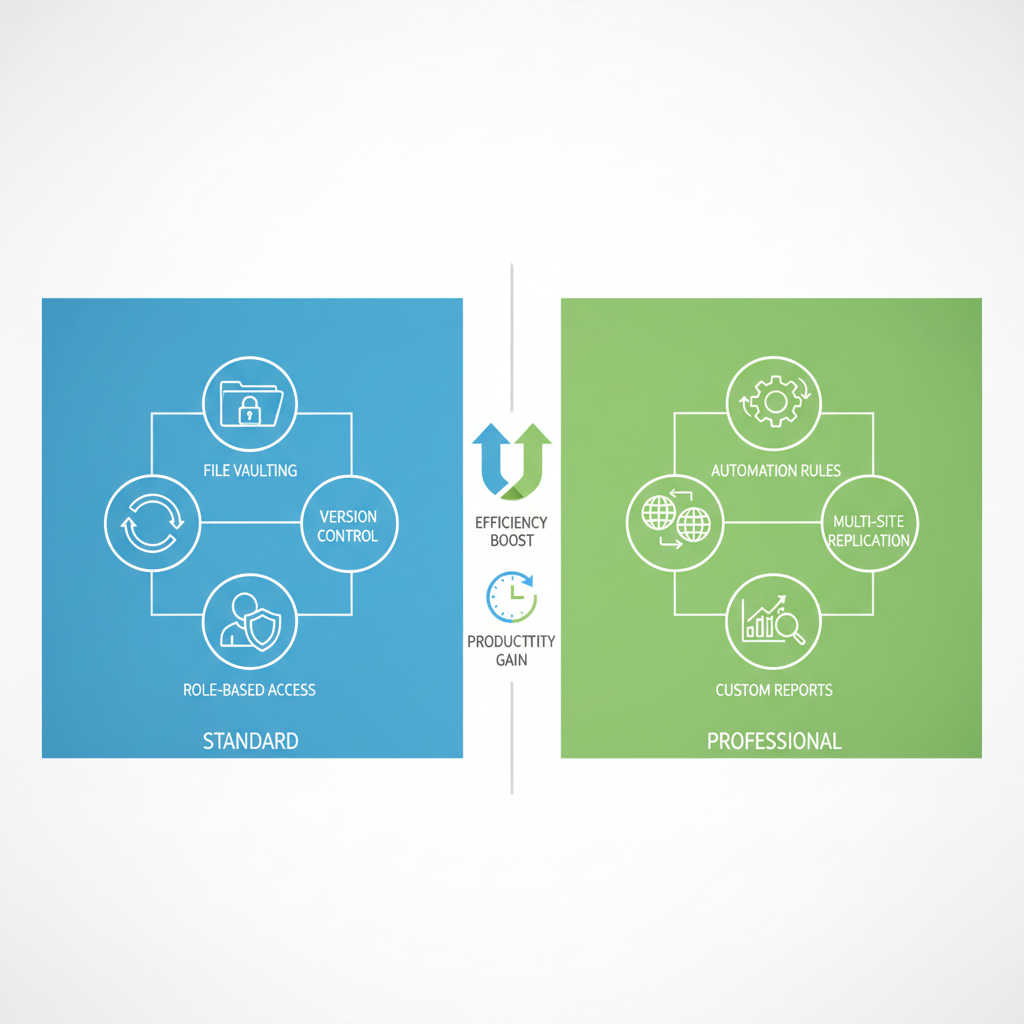
Side-by-side comparison of SOLIDWORKS PDM Standard vs Professional features
The visual above illustrates how Professional extends beyond basic functionality, preparing teams for advanced needs.
SOLIDWORKS PDM Professional vs Standard Comparison
When evaluating editions, SOLIDWORKS PDM Standard suits smaller teams with essential file management, while SOLIDWORKS PDM Professional addresses enterprise scalability. The Standard version provides core vaulting and version control but lacks depth in automation and distributed access. In contrast, Professional unlocks customization and integration vital for growing manufacturers. Our experience deploying both editions shows that upgrading enhances productivity, especially for automotive use cases involving complex assemblies where data consistency is paramount.
The following table compares key capabilities, drawing from official SOLIDWORKS resources to highlight differences:
| Capability | Standard | Professional | Business Impact |
|---|---|---|---|
| Automation Rules | Limited | Advanced scripting: Full workflow automation | Streamlines approvals: Reduces manual tasks by 40% |
| Multi-Site Replication | No | Yes: Global team synchronization | Supports distributed manufacturing: Ensures data consistency across locations |
| Custom Reports | Basic | Advanced analytics: Detailed usage insights | Informs process improvements: Tracks ROI on PDM adoption |
This comparison underscores Professional’s advantages in automation and replication, as validated by industry guides on PDM tools, which praise SOLIDWORKS for its integration strengths. For scaling teams, these features reduce silos and accelerate decision-making–business impacts like the 40% task reduction stem from documented efficiencies in workflow scripting.
Migrating from Standard to Professional involves a structured path, including data vault exports and solidworks license upgrades, which our experts handle to minimize downtime. We recommend Professional for enterprises needing multi-site support and ERP ties, such as DELMIAWorks for synchronized manufacturing data. In automotive scenarios, it manages assembly revisions across suppliers, preventing costly errors. Contact us for tailored evaluations; results vary by implementation, but our training ensures optimal feature utilization. This depth positions teams for future growth, previewing practical deployment steps ahead.
Practical Implementation of SOLIDWORKS PDM
We guide manufacturers through the practical implementation of SOLIDWORKS PDM to streamline their design workflows and enhance collaboration. This section outlines deployment strategies for both SOLIDWORKS PDM Standard and SOLIDWORKS PDM Professional, emphasizing secure file management and our expertise at GSC 3D in supporting these initiatives. By following these steps, teams can achieve efficient PDM deployment processes tailored to their needs.
Setting Up and Deploying SOLIDWORKS PDM Standard
Setting up SOLIDWORKS PDM Standard provides small teams with a straightforward foundation for managing CAD files. This version suits initial configurations where simplicity and cost-effectiveness are priorities. We recommend starting with a thorough assessment of your current file structure to ensure smooth integration.
- Server Installation: Begin by installing the PDM database on a single dedicated server. Ensure compatibility with SOLIDWORKS 2025 by following the latest guidelines from the SOLIDWORKS What’s New documentation, which highlights enhanced setup wizards for quicker configuration. Allocate sufficient hardware, such as a server with at least 16 GB RAM and SSD storage, to handle basic vault operations without performance issues.
- User Onboarding: Add users via the administration console and assign basic permissions. Introduce SOLIDWORKS PDM to your team through introductory sessions, focusing on check-in and check-out procedures. Our basic bootcamp training equips users with essential skills for daily operations.
- Initial Configuration: Customize vaults for your projects, setting up folders for part libraries and assemblies. Test basic file locking to prevent overwrites, using simple permission rules. For small teams in sectors like industrial equipment, this setup supports secure data sharing without overwhelming complexity.
- Testing and Go-Live: Conduct pilot tests on a subset of files to verify functionality. Address common pitfalls, such as insufficient backups, by scheduling automated daily exports. We at GSC 3D assist with these steps through our solidworks engineering services, ensuring a reliable rollout.
In practice, this process takes about two weeks for a team of five, allowing quick adoption. A troubleshooting tip: If synchronization issues arise, verify network latency and consult SOLIDWORKS help docs for resolution. Our support helps aerospace teams maintain compliance during setup.
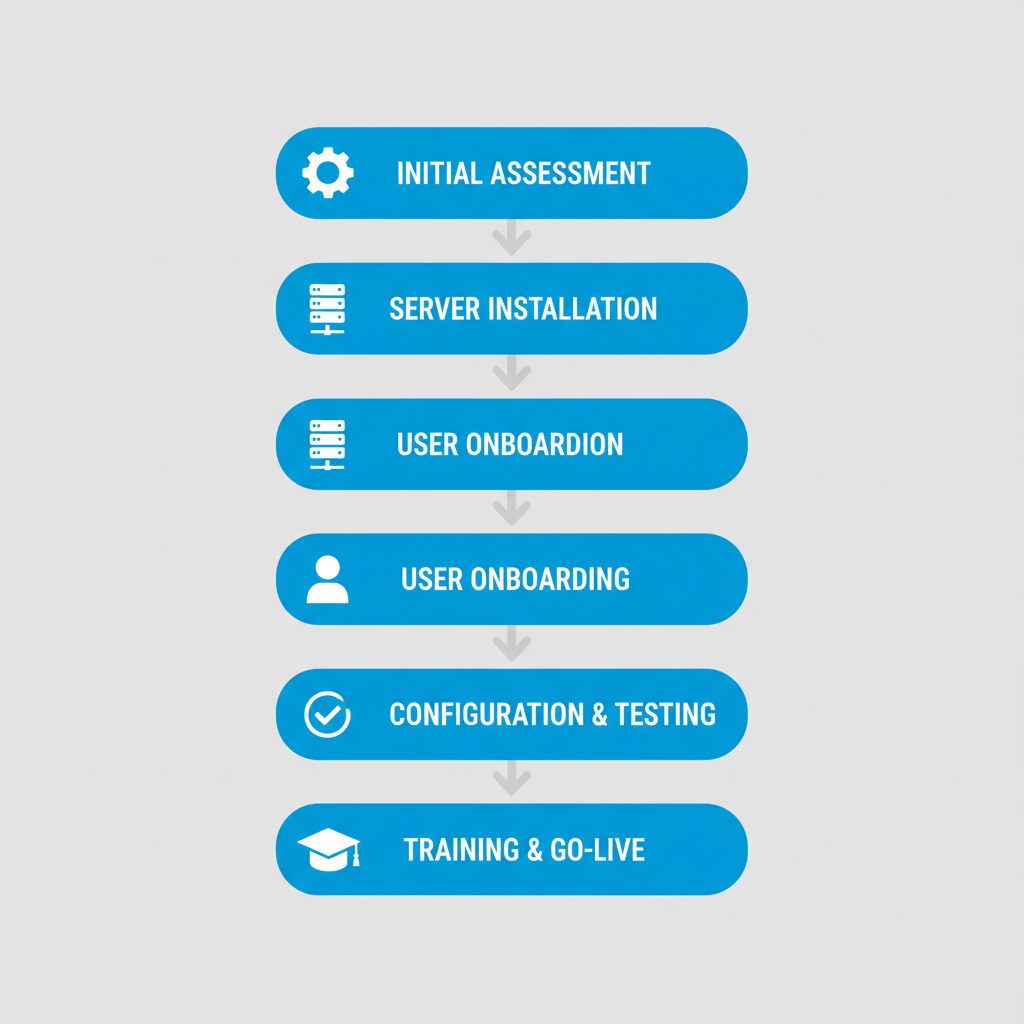
Five-step vertical diagram for SOLIDWORKS PDM implementation process
This diagram visualizes the overall PDM deployment process, from planning to optimization, which applies across both Standard and Professional editions. It underscores the importance of methodical progression to avoid disruptions in manufacturing workflows.
Implementing SOLIDWORKS PDM Professional for Teams
For growing teams, implementing SOLIDWORKS PDM Professional unlocks advanced features like multi-server scalability and robust automation. This edition excels in complex environments, such as automotive design, where migration from legacy systems is common. We leverage tools from the PDM Systems guide to ensure SOLIDWORKS-specific compatibility during deployment.
Key strategies include assessing your existing vault for migration using built-in utilities, which have seen improvements in recent updates for faster data transfer. Configure automation rules for workflows, integrating with ERP systems like DELMIAWorks for seamless operations. Hardware requirements scale up, recommending clustered servers with redundant storage to support larger user bases.
To aid planning, consider the differences in deployment approaches between the two editions. The following table outlines key steps:
| Step | Standard Approach | Professional Approach | GSC 3D Recommendation |
|---|---|---|---|
| Initial Setup | Single-server install | Multi-server config | Start with Standard for pilots; We assist with assessment |
| User Training | Basic bootcamp | Advanced customization training, SOLIDWORKS CAD Manager’s Bootcamp | Tailored sessions for migration; Hands-on with our experts |
| File Locking | Basic permissions | Advanced rules and audits, Automated enforcement | Consult us for secure workflows; Integration with PDM support |
| Testing | Basic validation | Comprehensive testing suites | Pilot programs with our team for thorough validation |
This comparison highlights how Professional offers greater flexibility for secure file management, particularly through audit trails that track changes in real-time. For instance, advanced rules prevent unauthorized edits in critical aerospace assemblies, reducing risks in collaborative projects.
Migration benefits are significant, as Professional’s tools minimize downtime during transitions, often completing in phases over a month. We play a pivotal role in smooth rollouts by providing hands-on guidance and custom integrations, drawing from SOLIDWORKS help docs to incorporate enhancements like improved file security. Common challenges, such as handling large assemblies, are addressed through our tailored bootcamps, ensuring teams master automation early. For file locking, implement role-based permissions and notifications to enforce best practices, enhancing overall data integrity. Our engineering services further optimize these implementations for long-term efficiency.
Advanced SOLIDWORKS PDM Strategies
For enterprise manufacturers seeking to scale their design operations, advanced SOLIDWORKS PDM strategies unlock greater efficiency and collaboration. Building on foundational implementations, these tactics focus on enterprise PDM upgrades that integrate seamlessly with broader manufacturing ecosystems. At GSC 3D, we specialize in guiding clients through sophisticated deployments that align with evolving production demands in sectors like industrial equipment and aerospace.
Upgrading from basic setups to SOLIDWORKS PDM Professional delivers significant advantages in automation and reporting capabilities. This edition enables custom scripting for streamlined workflows, reducing manual data entry and minimizing errors across design teams. Enhanced reporting tools provide real-time insights into project statuses, facilitating better decision-making and resource allocation. According to industry guides on best PDM tools, such upgrades validate SOLIDWORKS’s position through advanced features that boost productivity without disrupting operations. We have seen clients achieve faster time-to-market by automating revision controls, ultimately improving ROI through reduced downtime. Cost considerations for migration include licensing adjustments, but the long-term savings in operational efficiency often outweigh initial investments. Licensing information confirms that Professional editions scale effectively for growing enterprises, offering flexibility as teams expand.
Evaluating suitability starts with assessing team size and complexity. SOLIDWORKS PDM Standard fits well for small teams handling straightforward projects, providing essential file management without overwhelming features. However, for larger operations with multi-site needs, SOLIDWORKS PDM Professional excels by supporting advanced permissions that secure sensitive data across distributed locations. Key differences include:
- Permissions Management: Standard offers basic access controls, while Professional allows granular role-based permissions for complex hierarchies.
- Scalability: Standard suits up to 50 users, but Professional handles enterprise volumes with robust vault architecture.
- Migration Ease: We assist with phased transitions, including data audits and training via our SOLIDWORKS CAD Manager’s Bootcamp to ensure smooth adoption.
Industrial equipment manufacturers, for instance, benefit from Professional’s scalability in managing vast part libraries. Migration strategies involve our consulting to map current workflows, minimizing disruption while addressing cost through bundled support packages.
Advanced integrations further elevate SOLIDWORKS PDM, such as synchronization with SIMULIA for finite element analysis (FEA) in simulation-driven designs. We provide expertise in ERP synchronization, like DELMIAWorks integration, to align product data with manufacturing execution systems. This advanced data synchronization ensures real-time updates from CAD to production floors, critical for automotive and electronics sectors. Our DriveWorks automation services customize add-ins for repetitive tasks, enhancing output in high-volume environments. Additionally, pairing PDM with Markforged 3D printing streamlines prototyping workflows.
To illustrate edition fit in enterprise scenarios, the following table compares key use cases:
| Use Case | Standard Suitability | Professional Advantages | GSC 3D Expertise |
|---|---|---|---|
| Large-Scale Collaboration | Limited for small teams | Multi-site support | DELMIAWorks integration |
| Automation for Workflows | Basic rules only | Full scripting | DriveWorks add-ins |
These scenarios highlight how Professional addresses limitations of Standard in dynamic settings. For reporting and analytics, though not detailed here, Professional’s tools enable comprehensive dashboards. We recommend upgrading to Professional for most enterprises, supported by our tailored consulting. Contact us to assess your needs and explore integrations, including insights from events like 3dexperience world 2026. Prices and availability are estimates and subject to change; contact us for a personalized quote.
Frequently Asked Questions About SOLIDWORKS PDM
What is the cost of a SOLIDWORKS PDM Professional license?
SOLIDWORKS PDM Professional licensing follows a flexible subscription model with per-user pricing. Costs depend on factors like user count, add-ons, and bundle options with SOLIDWORKS CAD. As a trusted SOLIDWORKS reseller, we at GSC 3D manage licenses and provide personalized quotes to help with budgeting. Prices vary, so contact us for details.
How does pricing work for SOLIDWORKS PDM Standard?
SOLIDWORKS PDM Standard offers term license options through subscription plans tailored to team needs. Edition pricing models consider deployment scale and integration requirements without upfront hardware costs beyond standard servers. Our team handles troubleshooting and support. For accurate PDM licensing options, reach out to us at GSC 3D.
What factors influence SOLIDWORKS PDM costs?
Key influences include the number of users, selected edition, and additional features. We recommend bundling with SOLIDWORKS CAD for efficiency. Prices and availability are estimates and subject to change; contact us for a personalized quote.
Elevating Your Workflows with SOLIDWORKS PDM
SOLIDWORKS PDM streamlines secure collaboration and scales with your manufacturing needs, enabling efficient engineering processes. For emerging teams, SOLIDWORKS PDM Standard offers essential file management, while SOLIDWORKS PDM Professional delivers advanced automation for complex enterprises. As your trusted SOLIDWORKS reseller, we at GSC 3D specialize in seamless deployments, DELMIAWorks integrations, and SOLIDWORKS CAD Manager’s Bootcamp training to maximize your investment.
Partner with us for a personalized consultation to optimize your PDM solutions and explore simulation services like fatigue analysis. Looking ahead, upcoming SOLIDWORKS enhancements promise even greater interoperability, keeping your workflows ahead of the curve.
Resources


Companies that trust GSC